Setup Your Iptables Firewall In 5 Minutes

Firewall 5 minutes tutorial

Iptables is the most popular firewall when it comes to Linux security. There are several tools that hide all the complicated iptables rule mangling (such as UFW), but when you’re dealing with VPSs (Virtual Private Servers), sooner or later you’ll need to ditch UFW and go with iptables. Continue reading

Posted in Tech Tips | Leave a comment

Latency Monitoring Augmented With Hourly Breakdown, TCP State and Country Breakdown

Sample Latency Monitoring TCP State BreakdownIn the last couple of weeks, we’ve revamped the whole latency information displayed, and made it more useful, by adding:

  1. Hourly breakdown – select an interval of 7 days maximum and get an hourly chart to easily spot problems or weird patterns.
  2. TCP state breakdown – see check state timing information, such as DNS resolve time, time to first byte, or how much does it take the email server to answer the EHLO command.
  3. Country breakdown – it’s down-straight normal to get different response times from different locations around the world. Now Monitive shows you how your service responds from different countries. Continue reading
Posted in Product Updates | Leave a comment

Byobu – The linux command-line taskbar

If you spend anywhere between a few hours per week or all day long on terminals such as SSH, managing servers, developing or just trying out new tools, you can easily get lost between windows or tabs. This is where screen might give you a hand, but if you don’t have a really good memory, you’ll soon forget what you have in which screen. And if you work with several servers at a time, screen is not going to get you very far.

Here’s where Byobu rocks. It magically added all those features that you’re missing in your terminal, and in the usual screen tool. It works on top of screen, so you don’t have to learn how to use it all over again. I found it when I launched screen on a recent installation of Ubuntu. Continue reading

Posted in Tech Tips | Leave a comment

Update: new SMS gateway, better messaging

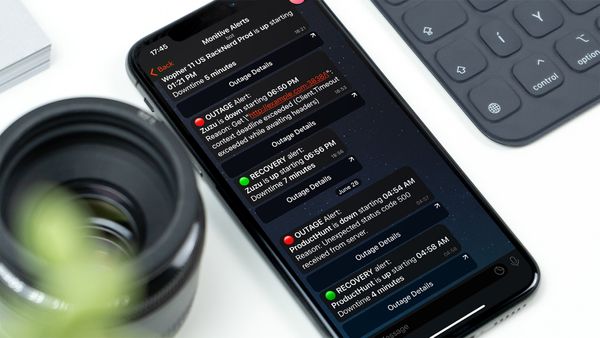
SMS Alerts - Uptime MonitoringReliability being our main focus, we contracted a new SMS sender called AMD Telecom. These guys take SMS delivery serious and even got offended when I asked if they take deliverability seriously. AMD Telecom connects and offers business intelligence to the Mobile Network Operators and large enterprises worldwide. Very proffessional people, great service, so now all SMS alerts are being dispatched by AMD Telecom.

Another update is the extra information in the SMS and Twitter alert. Everytime I get an alert on my phone stating that X website is down, I start wondering: “is there an error on the site? or is the server under load? or a networking problem?”. This happened because I didn’t get the symptoms of the outage in the message. Also, when I look at my phone, I have to look up when did I got the message, and to rember what was my alert sentivity for that particular monitor, so I can tell when did it actually went down.

No more. From now on, you get the date and time when the site/service when down and the reason why we called it down. Toghether with the platform updates that we’ve launched weeks ago, you will get notified right on your mobile within seconds when a problem occurs.

And since reliability all comes down to the reliability to the services that our system uses, we still have SMSpm and BulkSMS as backup senders, so that if AMD Telecom is down, we’ll still make sure SMS alerts are safely on their way to your phones.

Posted in Product Updates | Leave a comment

Kickstart an Amazon EC2 Server

amazon-web-servicesAmazon Web Services is usually a good choice when you need to deploy something fast, scale fast or even try things out, for example to set up an instance of SugarCRM without deploying it on your live server.

An alternative to this would be starting a virtual server on your workstation, but this limits you a lot and you can’t do simple things such as showing it to your boss, friends or potential clients / users.

Anyway, the beauty of Amazon services is that you only pay for what you use. And if you just need to try things out, a minimal server costs just cents per hour. If you’re not willing to pay that much, then you’re just playing around without any real need and you might go with a free solution such as VirtualBox and some virtual server installed right on your computer.

I don’t remember exactly how the signup process for the Amazon services was back a few years when I signed up, but I remember that I went right through it and got my servers up and running in minutes. Amazon is doing a really great job at measuring user experience and improving their services as they go along.

Create and launch your server

The first thing you need to do is log into your Amazon AWS console: https://console.aws.amazon.com

Continue reading

Posted in Tech Tips | 1 Comment

The Importance of Owning Websites For Businesses

Business WebsiIt may be an overused topic, but it is still important to inform people of how important websites are to all businesses. No matter how small or how big they are, it would be important for their presence to be felt by the people. What better way than to reach their prospects by building their names through their own websites? Continue reading

Posted in Tech Tips | Leave a comment

Factors Affecting the Slowness of A Website

Website slowness

It is without a doubt that page loading time affects a website’s usability. No matter what the reason is, website visitors would simply click the close button when their patience has been tried by a slow website. While webmasters can do something to quicken it, this would mean that they will remove certain parts of their websites that add up to the aesthetic factor. But then again, lessening the unneeded parts would be much better than visitors leaving the website without checking the contents it may have. Potential loss of visitors would lead to loss of income, so it is always better to have faster websites than slow ones. Continue reading

Posted in Tech Tips | 1 Comment

Welcome aboard, Janice!

Screen Shot 2013-02-01 at 7.49.01 PMMonitive’s team just got bigger! Starting this week, Janice is our Marketing Specialist, so her job is to make sure that lots and lots of site owners and system engineers hear about our great service. And considering that there are roughly 200 million active websites in the world, this will not be a boring task to acomplish.

She will also handle most of our Social Media outreach, so be sure to follow us on Twitter, Facebook and Google+ to read about interesting news in the IT industry.

Janice will focus on building traffic, SEO, content publishing, Social Media and she’ll also write neat stuff on our company blog.

We’re always happy when our team grows, as this is a clear sign of prosperity and a confirmation what we’re going in the right direction.

Welcome Janice, we’re confident that you will do a great job!

Posted in Product Updates | Leave a comment

Give your team members access

Service uptime is usually a topic concerning more than just one team member. Yes, it’s Christmas eve, but starting today you can add as many users you’d like to your account, with read-only access or read-write to specific monitors that you choose.

Monitive extra users list

They will then be able to login and view all the information in the Monitive account, but they will not have access to subscription information, to change account information, delete or add alerts.

You can even choose to give them updating access to specific monitors in your account. Just head out to the Users option in the Account menu. For more information check out the  Monitive users article, in our knowledge-base.

Merry Christmas!

Posted in Product Updates | Leave a comment

SSL Certificate Expiration Monitoring

Monitive is all about its users, so here we are. We listened and we rolled out our new feature: SSL Certificate Expiration Monitoring. Now, for all the HTTPS sites you’re monitoring for uptime, we’re also checking for certificate expiration.

Because there’s no worst news for a customer or visitor than to get the scary “Connection Untrusted” message when accessing your services.

ssl-expiration

This is why Monitive will let you know that your SSL certificate is about to expire, starting at five days before the expiration date. What we do is access the website just like a regular visitor, every day, just to make sure that it’s not due to expire.

If it’s in danger of expiration, we’ll send you an email. And we’ll mail you every day, until you update it with a fresh certificate, or it expires. So you can expect five emails from us before your reputation starts to suffer.

We use this ourselves to check the certificate on https://admin.monitive.com so that we don’t get any surprises.

Posted in Product Updates | Leave a comment