Changelog

New features, fixes and improvements to the Monitive uptime monitoring service.

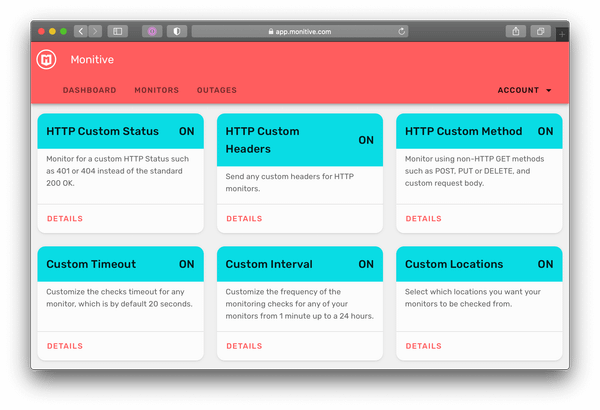
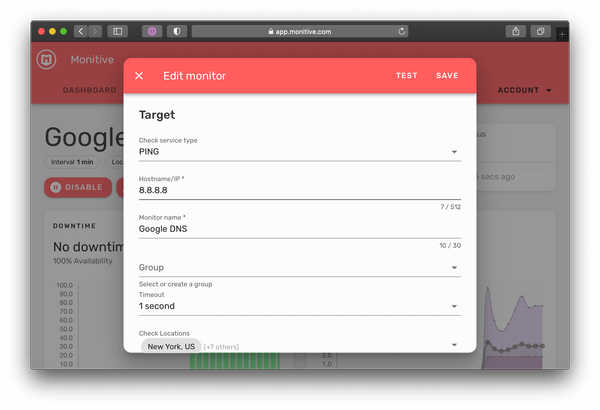
Six new HTTP features released

The following are now available:

  • HTTP Custom Status (such as 401, 404 etc.)
  • HTTP Custom Status monitoring (such as 404 or any other)
  • HTTP Custom Headers
  • HTTP Custom Method (such as POST, PUT, PATCH, DELETE etc.) + body payload to send
  • Custom Timeout (1 to 30 seconds)
  • Custom Interval (1 minute to 24 hours)
  • Custom Locations

This allows you to monitor a plethora of HTTP services, from simple pages to API authentication requests or pretty much anything you might need.

New features

  • feat: Custom Locations feature (#64)
  • feat: add service type to mobile monitor card
  • feat: optimize mobile list loading
  • feat: compact monitor list header actions (mobile)
  • feat: Mobile compact monitors list (#69)
  • feat: show 25 monitors per page
  • feat: Custom Interval feature (#63)
  • feat: add custom timeout (#62)
  • feat: HTTP Custom Headers (#58)
  • feat: HTTP Custom Method (#56)
  • feat: Custom HTTP status feature (#46)
  • feat: add HTTP Status instructions
  • feat: show all features as coming soon if not available

Other improvements and fixes

  • fix: custom edit issues & simplify edit dialog (#68)
  • fix: add ping into
  • fix: null when we don’t have headers
  • fix: small chip on group tag (#70)
  • fix: don’t start Bugsnag if we don’t have a key
  • fix: show precision and scale according to service type
  • fix overall latency chart
  • fix: test without status code
  • fix: second fixing attempt
  • update cloudflare serving
  • don’t cache index.html
  • fix: Basic Auth copy
  • upgrade to Vue 2.3.14
  • chore: upgrade JS packages (#44)
  • docs: add useful resources
  • add event tracking and fix some issues (#48)

API updates

  • feat: enable new features for the public (#278)
  • feat: don’t allow Free plan users to save a monitor with non-email alert rules (#272)
  • feat: added TLSHandshake to results (metric9) (#225)
  • feat: custom check locations (#227)
  • feat: disable non-email alert rules for downgraded users (#247)
  • feat: retrieve a monitor’s custom locations (#250)
  • feat: remove HTTP Custom Status on feature deactivation (#258)
  • feat: reduce minimum timeout to 1 second (#263)
  • feat: feature removal listener handler for all implemented features (#262)
  • feat: mention free sms call alerts (#182)
  • feat: send failed jobs to Bugsnag (#183)
  • feat: added Ametrine bonus (#186)
  • fix: misleading Dispatching errors by Sprinkler (#277)
  • chore: updated dependencies (#268)
  • fix: add type tag when updating missing (#264)
  • chore: upgrade LineProtocol to handle measure9 (#198)
  • chore: updated dependencies (#217)
  • updated dependencies (#234)
  • fix: statusCode should be coming as numeric (#235)
  • fix: convert PING metrics to be usable (#223)
  • fix: validation error for /data/attributes/settings/statusCode & data.attributes.settings.keywordBody (#241)
  • fix: downgrade to free time fix (#242)
  • fix: set Ping metric1 as Average RTT (#244)
  • fix: all upgraded users are downgraded after the trial period (#248)
  • chore: updated dependencies (#257)
  • fix: changed Sprinkler runtime to 65s to fix AltThree\Locker\Exceptions\UnableToAcquireLockException (#206)
  • docs : added a view for the list of rendered emails for dev environment (#200)
  • chore: updated dependencies (#193)
  • fix: updated CTA in the trial expiration emails (#195)
  • chore: extended Sprinkler runtime to 90 seconds (#196)
  • chore: added generic BCC of Mailables being sent to customers (#197)
  • fix: phone number sender issue to +14******064 (#199)
  • fix: Sprinkler dispatching too many monitors per location (#180)
  • fix: configured custom $tries, $timeout for Jobs\Sprinkler (#181)
  • fix: update the “Sprinkler has no monitor to check for a specific interval” to info level.

Test monitor before save

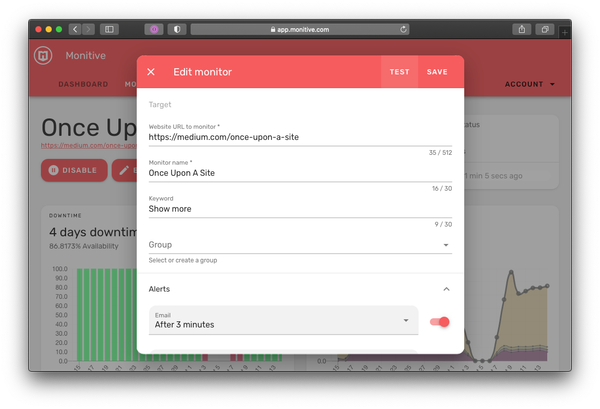
This feel like starting off on the wrong foot with either a new or even an older monitor, since the outage caused by the mismatched settings will go down in history.

The solution to this is a very useful Test button just next to the Save button which does exactly that: Checks the current monitor settings without updating them.

Other improvements and fixes

  • New: Show link to monitor URL.
  • New: Add support for adding PING monitors (beta).
  • New: Show a user if he’s on the free trial period and how many days he has left.
  • New: Show a warning if trying to add a monitor when account is at maximum monitors for the current plan.
  • New: Show if there’s a bonus available on the Plan page.

API updates

  • New: added ‘custom_check’ to ‘beta_only’ team features (#161)
  • Fix: remove sprinkler status check (#159)
  • Fix: restart PHP 7.3 after deploy
  • Fix: ping service outage/recovery alerts not send (#174)
  • Fix: enable testing and checking of the ping service type (#166)
  • Chore: update dependencies (#154)
  • Chore: updated Horizon assets by running php artisan horizon:publish (#155)
  • Chore: update dependencies (#173)
  • Chore: rename team features and add handlers (#164)
  • Refactor: Removed return statement from TeamsMonitorsController@all (#138)
  • Refactor: Changed Sprinkler console command to a scheduled task (#126)

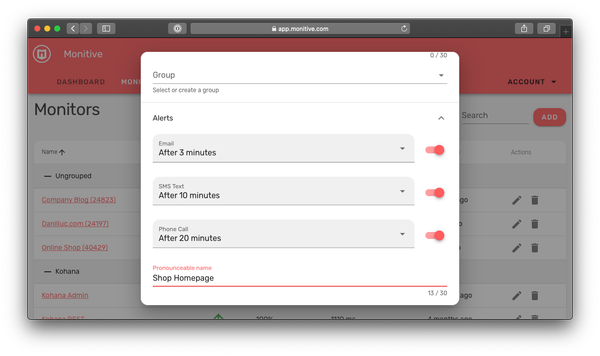
Pronounceable name

This way you will be sure you’ll understand right away what’s the outage alert phone call about.

Edit any monitor and scroll down to the Pronounceable Name input field to add a pronounceable name.

If you leave it empty, we’ll just use the monitor’s name.

Other improvements and fixes

  • Enabled the language selector (#31)
  • Added subscriptions and payments support (#5)
  • Detect and set country & timezone via CloudFlare and JS (#26)
  • Fixed: send proper ?include=team when deleting (#3)
  • Fixed: show Stripe error message if we receive one (#29)
  • Fixed: display VAT ID if user previously saved it (#28)
  • Fixed: show card saving feedback and allow user to update card (#27)
  • Fixed: adjust translations and styling for the feature cards
  • Fixed: align back arrow with title on secondary titles
  • Fixed: add/edit monitor dialog was confusing New vs Add
  • Fixed: show interface when refreshing the page in the Help section
  • Fixed: set password validation (#32)

API updates

  • Remove previous tax IDs when updating customer billing info
  • Add altruistic plan and get the actual plan a team is on
  • Added status_code setting to http Monitors
  • Generate user access token for technical support
  • Coupon support for teams
  • Manage bonuses
  • Fixed: don’t report authentication failures in the logs.

Spanish Monitive homepage

Other improvements and fixes

  • Updated the GeoIP JS used preselect the country dropdown on Sign Up.
  • Fixed a sign-in issue showing “Something went wrong” instead of “Incorrect email or password”

API v0.8.9 Released

  • Migrated API backend from Lumen to Laravel.
  • add pronounceable attribute to the monitors, using it for call alerts pronounciation.

Migration Issue Fixed

This is now fixed.

Other improvements and fixes

  • Added redirect to Monitive Classic status pages.
  • Fixed a logging issue with Mailchimp’s event sending.
  • Added Sign in link on Monitive’s homepage header.

Monitive `Freyja` Official Launch

There are a lot of great updates coming up in the next months and we’re excited to get your feedback on the new Monitive, so please add your suggestions or feedback in the Feedback Forum.

Other improvements and fixes

  • Changed response time measurement from milliseconds to seconds.
  • Added “Last 30 Days” above the Uptime and Response time charts.
  • Changed the monitive.com homepage with the new Monitive.
  • Moved the old monitive homepage to classic.monitive.com.
  • Added onboarding screens for accounts less than 7 days old.
  • Added links in the new homepage’s footer to Monitive Classic Homepage and Monitive Classic Admin account.

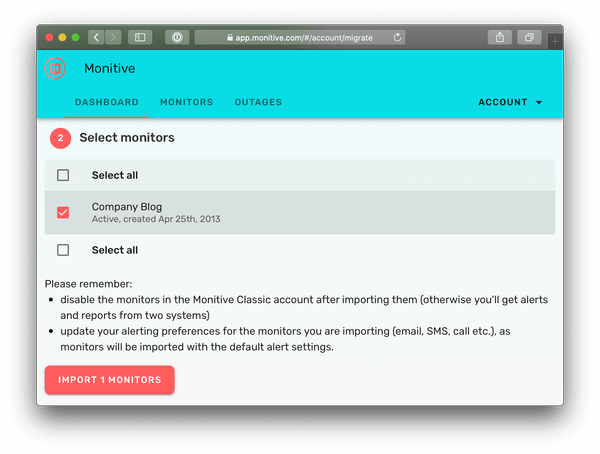
Migration Tool from Monitive Classic accounts

Other improvements and fixes

  • Updated the mobile bottom navigation bar and fixed navigation bar height / position in mobile full-screen mode.
  • Fixed weekly & monthly uptime report - overall availability percentage, it was not taking into account the number of monitors, resulting in lower than actual availability %.
  • Fixed report heading when the availability was 100%.

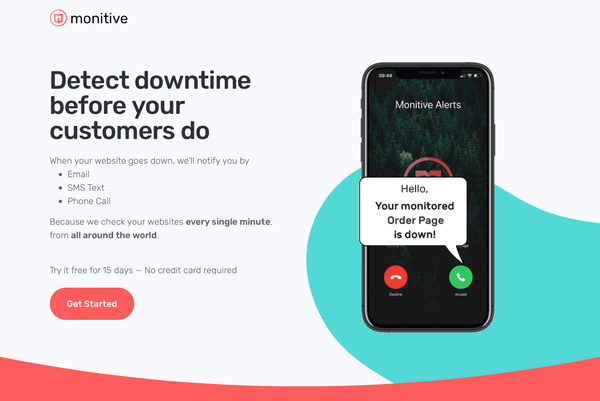
Articulated call alerts via Amazon Polly

Long story short, we’re now using Amazon Polly to generate naturally-sounding alert calls using Joanna’s Neural voice.

Other improvements and fixes

  • Fixed desktop Incidents table in the View Monitor page not showing duration nor outage end date/time;
  • Updated the duration in all the outages display to a human-readable format (hours, minutes, seconds);
  • Updated the reports header to be consistent with the brand;

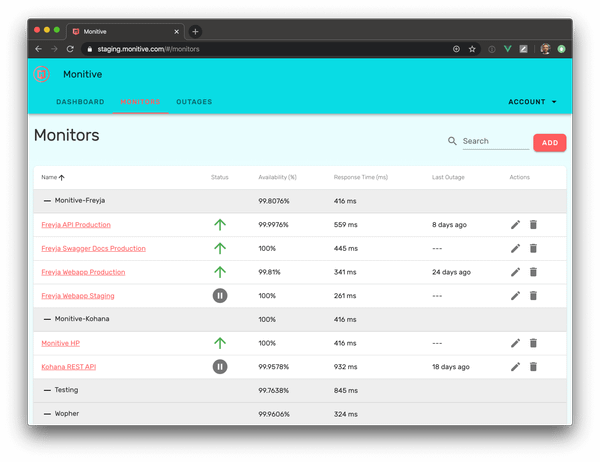
Group Monitors

You also get aggregated availability and response time for each group of monitors.

If you want it, just head out to Features & Apps in your Account / Profile menu, and enabled it. After that, on the edit / add monitor page you can create or select a group.

Other improvements and fixes

  • The Features & Apps page has been polished.
  • Various card styling was updated for consistency.
  • The edit / delete icons in the desktop list of monitors were too small.
  • Phone call outage alerts were enabled for the following countries: Mexico, Spain, Portugal, Denmark, Switzerland, Malaysia, Thailand;
Mobile Progressive Web App (PWA)

The advantage is that you’re always logged in, it automatically refreshes when an update is available and it is going to be packaged in mobile app that will be available in the App Store / Play Store later this year.

Other improvements and fixes

  • User profile could not be updated when the signup email was longer than 30 characters.
  • The UK flag was missing in the Recent Checks card.
  • Phone call alerts to Mexico failed due to Twilio Geo permissions mismatch.
  • PWA refresh was broken.