
Send a custom HTTP request
What it does
Section titled “What it does”An HTTP monitor can send more than a plain GET. Four fields control the request: method (one of GET, POST, PUT, DELETE, PATCH, OPTIONS — there’s no HEAD), body, headers (name/value pairs), and timeout in seconds (1-30, default 30). These only apply to type: "http" monitors.
A header value is never returned by the API once it’s saved — a response shows {"name": "...", "value_set": true} for a header with a stored value, or value_set: false for a header stored with an empty value. Either way, the value itself isn’t serialized again. That covers API and MCP reads only: it doesn’t change where the probe sends the value. Every configured header goes out on every request the probe makes, including after the monitored URL redirects elsewhere — point the monitor at the final URL rather than one that redirects to a different host.
The body is not write-only — it’s returned verbatim in every read. Put a credential in a header, never in the body.
No Content-Type header is added automatically. If your endpoint needs one, add it yourself.
The configured method, body, and headers go out on creation (the API runs an immediate test check before returning), on every scheduled check, every manual Run test, and the confirmation checks other regions run after a failed check — not just once. Point a non-GET request at an endpoint that’s safe to call repeatedly, such as a dedicated health check, not one that changes data on every call.
Set it up in the app
Section titled “Set it up in the app”- In the dashboard, click New monitor.
- Set Type to HTTP and fill in Name and URL.
- Click Advanced to expand the extra fields.
- Set Method to the HTTP method you need.
- Set Timeout (s) if 30 seconds is too long or too short for your endpoint.
- For
POST,PUT,PATCH, orDELETE, a Body field appears — enter the request body. - Under Headers, click Add header for each header, and fill in its name and value.
- Click Add to save — this invokes the target immediately with the configured method, body, and headers, before the first scheduled check runs.
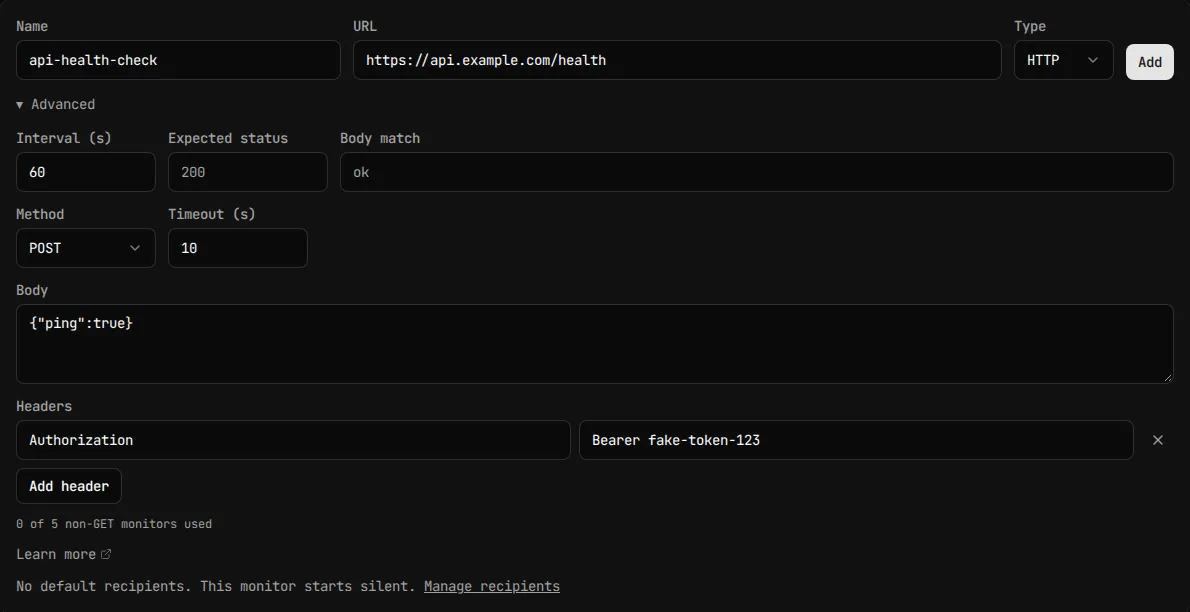
Once the monitor is saved, use Run test to send an ad-hoc check. It sends the saved request — method, body, headers, and timeout exactly as they’re stored — so save your edits first; the test endpoint doesn’t see unsaved changes in the form.
Do the same through the API or MCP
Section titled “Do the same through the API or MCP”POST /api/v1/monitors also invokes the target immediately, with the request below, before it returns:
curl -X POST https://api.monitive.com/api/v1/monitors \ -H "Authorization: Bearer $MONITIVE_API_KEY" \ -H "Content-Type: application/json" \ -d '{ "name": "api-health-check", "url": "https://api.example.com/health", "type": "http", "method": "POST", "body": "{\"ping\":true}", "headers": [ {"name": "Content-Type", "value": "application/json"}, {"name": "Authorization", "value": "Bearer ..."} ], "timeout_sec": 10 }'The response wraps the monitor in the same monitor/state envelope as Create a monitor; headers are echoed under monitor.headers, without their values (abridged):
{ "monitor": { "id": 1287, "headers": [ {"name": "Content-Type", "value_set": true}, {"name": "Authorization", "value_set": true} ] }, "state": { "status": "up", "last_check_at": "2026-05-07T10:21:01Z" }}value_set is false when a header is stored with an empty value — the header still exists and is still sent; it just has nothing after the name.
To change a monitor with PUT, send a complete headers array — it replaces the whole list. Omit value on an entry to keep that header’s already-stored value instead of resending it:
curl -X PUT https://api.monitive.com/api/v1/monitors/1287 \ -H "Authorization: Bearer $MONITIVE_API_KEY" \ -H "Content-Type: application/json" \ -d '{ "headers": [ {"name": "Content-Type", "value": "application/json"}, {"name": "Authorization"} ] }'If the URL’s scheme, host, or port changes in the same request, every header’s value must be resent — keeping by omission isn’t allowed across a destination change.
Through MCP, create_monitor and update_monitor accept the same method, body, headers, and timeout_sec fields, with the same keep-by-name rule for update_monitor’s headers. Use Monitive through MCP lists the available tools, and Monitors covers the shared create/update envelope — for the complete field-by-field request and response schema, see the API reference.
Plan limits
Section titled “Plan limits”- Up to 5 non-
GETmonitors per account, counting disabled ones. Creating or updating a sixth returns409withnon-GET monitor limit reached (max 5 per account). - Body: up to 4,096 characters.
- Headers: up to 20 entries.
- Headers total size: 8,192 bytes, counting each header’s name length + 2 + value length.
timeout_sec: 1 to 30.- Blocked header names, matched case-insensitively:
Host,Content-Length,Transfer-Encoding,Connection. - Header names must be valid RFC 7230 tokens. Header values can’t contain CR, LF, NUL, or other control characters — a literal tab is allowed.
See Monitors for the shared monitor limits (name length, monitor count caps).
Troubleshooting
Section titled “Troubleshooting”“method must be one of: GET, POST, PUT, DELETE, PATCH, OPTIONS.” The method you sent isn’t in the allowed list — note there’s no HEAD.
“body must be 4096 characters or less.” Your request body is too long — trim it or move data to a header.
“headers must be 20 or fewer.” Combine or drop headers to get under the cap.
“header "X" is not allowed.” You sent one of the blocked names (Host, Content-Length, Transfer-Encoding, Connection). These are controlled by the HTTP client itself and can’t be overridden.
“header "X" has no stored value to keep.” You sent a PUT with a header entry that omits value, but no value is stored for that name yet — every new header name needs a value the first time.
“headers must be resent with their values when the URL’s scheme, host, or port changes.” You changed the monitor’s destination in the same request that also touched headers without value. Resend every header’s actual value alongside the new URL.
“timeout_sec must be between 1 and 30.” Pick a value in that range.
The server returns an error about a missing or wrong Content-Type. The probe doesn’t add one automatically — add a Content-Type header yourself that matches your body format.
Run test doesn’t reflect an edit I just made. Save the monitor first — Run test sends the saved request, not the form’s current unsaved state.

Your first monitor takes 30 seconds.
Sign in with GitHub, Google, Microsoft, or email, and your first check runs right away. 50 monitors, free, no card.